How can you read a script while recording video on iPhone?
Use one iPhone to display a scrolling script and record video, position the prompt near the lens, set a natural pace, and fix common eyeline problems.
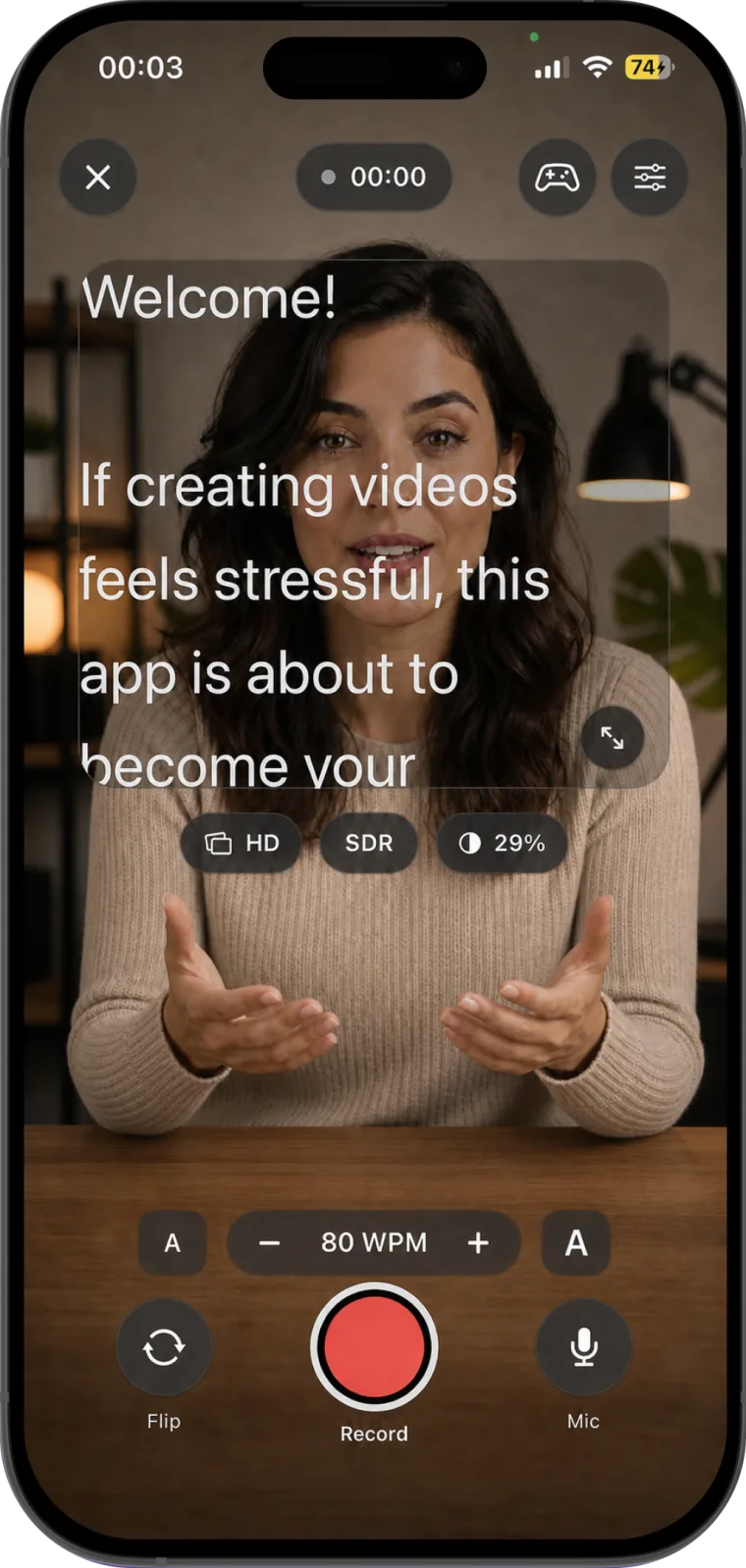
Yes. You can read a script while recording video on one iPhone by using a teleprompter app with a built-in camera. The app places scrolling text close to the lens while it records, so you do not have to memorize every line or keep looking toward notes on another screen.
How can you read a script while recording video on iPhone?
The simplest one-device method is to prepare the script inside a video teleprompter app, position the reading area beside the front camera, set a comfortable scroll speed, and record a short test before the full take. Teleprompter for video: Studio combines those steps on iPhone and iPad.
- Create a script or paste one into the app.
- Open the recording view and frame the shot.
- Move the prompt close to the camera lens.
- Set the text size and scrolling speed.
- Record a short test and review your eyeline and voice.
- Adjust the prompt, then record the complete take.
Choose between a one-device and two-device setup
| Setup | How it works | Best fit | Main limitation |
|---|---|---|---|
| One iPhone | A teleprompter app shows the script and records with the phone's camera | Talking-head videos, lessons, Reels, and work updates | The reading area is smaller |
| iPhone plus second screen | The iPhone records while a tablet or computer displays the script | Longer scripts or larger text | Visible eye movement if the screen is too far from the lens |
| Phone plus teleprompter glass | Mirrored text reflects in front of the camera lens | External cameras and more controlled setups | Requires compatible hardware and careful alignment |
Harvard's remote-teaching guidance also describes using an iPhone as the camera and placing a computer or laptop just below it as a teleprompter. That is a useful fallback when you prefer a larger script display, but a single-device app is quicker to set up and keeps recording controls in one place.
Put the script as close to the lens as possible
Prompt placement matters more than forcing constant eye contact. James Madison University recommends positioning a teleprompter at the same height as the camera lens and as close to it as the frame allows. If the words sit well below or beside the lens, viewers can see your eyes tracking away from them.
- Raise the iPhone to eye level instead of looking down at a desk.
- Keep the active reading line close to the front camera.
- Narrow the text area if your eyes visibly scan from side to side.
- Increase the font size before moving the phone closer to your face.
- Look at the lens for the opening and closing sentence when possible.
Use the front or rear camera deliberately
The front camera lets you monitor your framing while speaking, which is convenient for solo recording. The rear camera may suit a different production setup, but you will need a reliable way to check composition. Apple's iPhone guide explains the standard camera controls for switching cameras and changing recording modes; controls inside a third-party teleprompter app can differ.
Whichever camera you choose, lock in the phone position before tuning the prompt. Changing the height or distance afterward also changes the eyeline and apparent text size.
Set a pace you can speak, not a pace you must chase
There is no correct scroll speed for every speaker. Start below the pace you expect to use and record 15 to 20 seconds. Increase the speed only if you repeatedly wait for the next phrase. Slow it down if you clip word endings, lose emphasis, or stop breathing at natural points.
Teleprompter for video: Studio lets you change the words-per-minute setting and text size from the recording view. Make a small adjustment, test again, and keep the version that leaves enough attention for expression and meaning.
Format the script for a phone screen
A dense page is difficult to perform from a small display. Break the text into short spoken thoughts, use punctuation where you intend to pause, and rewrite any sentence that is hard to say in one breath. The University of Mary Washington's speaking guidance similarly recommends conversational wording, short sentences, and line breaks at natural pauses.
Compare these two versions:
| Harder to read aloud | Easier to prompt |
|---|---|
| In today's video, I will be providing a comprehensive explanation of the three settings that should be checked before recording. | Before you record, check three settings. First, let's fix the camera position. |
| Please be advised that results may differ as a consequence of lighting conditions. | Your result can change with the light. Here's what to check. |
Record a useful test before the full take
A test reveals problems that are difficult to judge from the preview. Watch it once with sound to check pace and once without sound to notice eye movement, posture, and framing.
- Confirm that the lens is near eye level.
- Check focus, lighting, microphone input, and background noise.
- Read a section containing both a short and a long sentence.
- Make sure the text does not pull your gaze far from the lens.
- Check that you can pause without losing your place.
- Change one setting at a time before testing again.
What should you do when you make a mistake?
Stop speaking, pause for a moment, return to the start of the sentence, and deliver it again. That quiet gap gives you a clean place to trim the recording. Teleprompter for video: Studio can pause and resume during a take, then trim, crop, adjust, and prepare the recording for vertical, square, widescreen, or cinematic output afterward.
If the words still feel difficult to deliver after the technical setup is correct, revise them with the related guide to writing a teleprompter script that sounds natural. For rehearsal and delivery technique, read how to use Teleprompter for video: Studio for natural-looking videos.
Common questions
Can the iPhone Camera app show a script while recording?
Apple's Camera app provides video recording controls, but Apple's current user guide does not document a scrolling-script teleprompter inside Camera. For a one-phone workflow, use an app that combines a prompt with camera recording. Another option is to record with Camera while displaying the script on a second device.
How do you read a script without looking away from the camera?
Place a narrow reading area close to the lens, keep the phone near eye level, use text large enough to read without leaning forward, and learn the opening and closing lines. Some eye movement is natural. The goal is to avoid repeatedly looking far away from the viewer.
Can you use the same iPhone as a teleprompter and camera?
Yes, when the teleprompter app includes video recording. Teleprompter for video: Studio shows the scrolling script beside the camera and records with the camera and microphone on compatible iPhone and iPad devices.