Best teleprompter apps for iPhone in 2026
Compare Teleprompter for video: Studio with five other iPhone teleprompter apps by scripts, recording, editing, captions, and remote controls.
The best teleprompter app for iPhone depends on whether you need a simple script reader, an integrated camera and editor, voice-following, captions, or professional external-display controls. Teleprompter for video: Studio is our first choice for recording and editing in one app. PromptSmart Pro is best for voice-following, BIGVU is best for caption-heavy social video, and Teleprompter by Teleprompter Apps Ltd is strong for traditional prompting setups.
Best teleprompter apps for iPhone: quick list
| App | Best for | Devices | Access |
|---|---|---|---|
| Teleprompter for video: Studio | Scripts, recording, editing, remote control, and external displays in one app | iPhone, iPad | See current App Store listing |
| Teleprompter for Video | Voice-assisted scrolling, captions, and broad script imports | iPhone, iPad, Apple Watch | Free with in-app purchases |
| BIGVU | Social video, automatic captions, themes, and branding | iPhone, iPad | Free with in-app purchases |
| PromptSmart Pro | Voice-following that pauses when the speaker pauses | iPhone, iPad | Paid download with in-app purchases |
| Teleprompter | Traditional prompting, script management, and professional rigs | iPhone, iPad, Apple Watch | Free with optional Pro upgrade |
| Teleprompter Video Script Pro | Picture-in-picture and a dyslexia accessibility mode | iPhone | Free with in-app purchases and advertising |
How we compared the apps
We reviewed the current App Store descriptions for script creation, scrolling controls, camera recording, pause and resume, video editing, captions, mirroring, remote controllers, external displays, local storage, device support, and access model.
We did not assign a universal numerical score because the useful criteria differ sharply. A solo creator recording short videos does not need the same setup as a studio using teleprompter glass, external displays, remote operators, and imported documents.
1. Teleprompter for video: Studio: best integrated recorder and editor
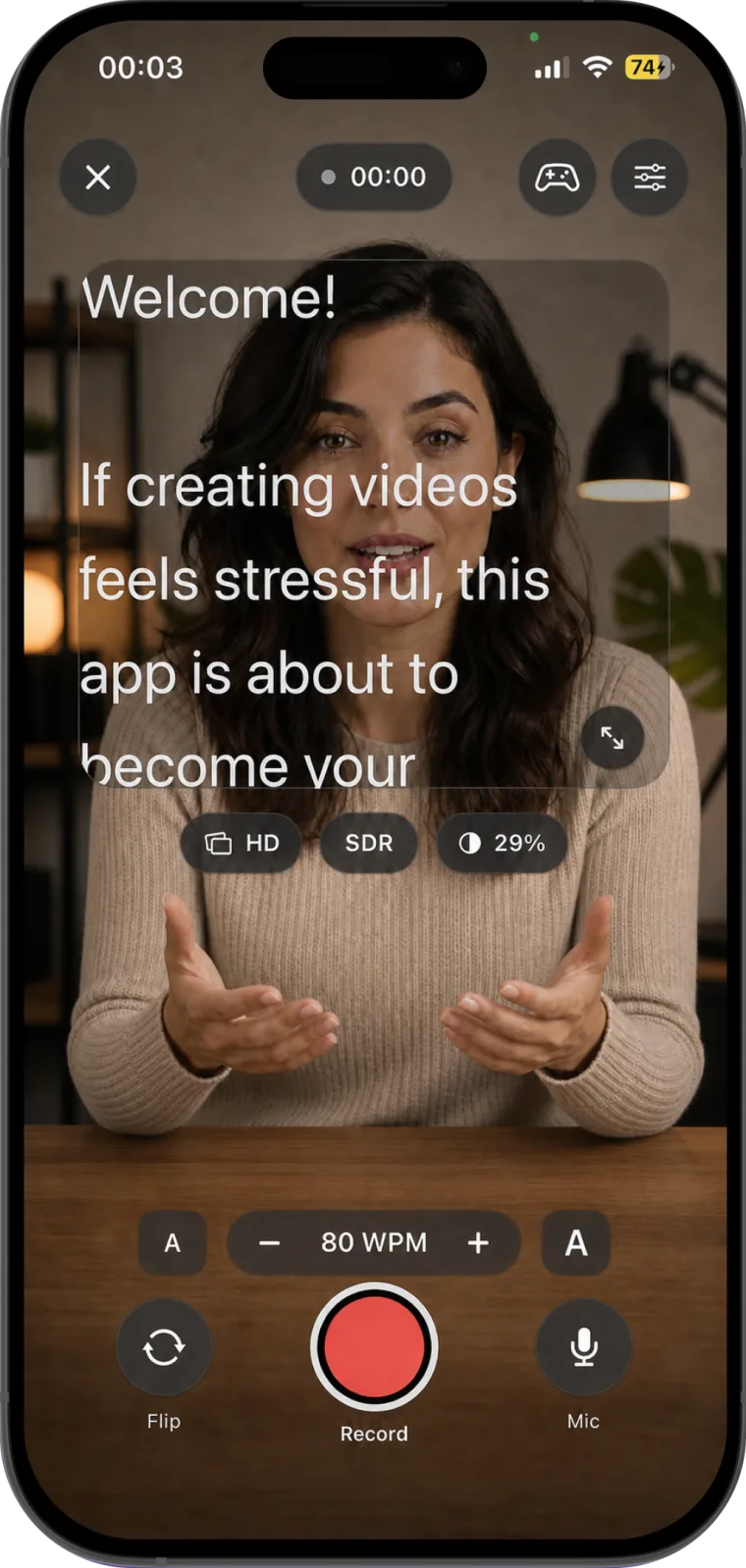
Teleprompter for video: Studio lets you create and organize scripts, place scrolling text beside the camera, adjust words per minute and text size during recording, switch cameras, and pause or resume without losing your place.
After recording, the app can trim, crop, adjust, and export video for vertical, square, widescreen, and cinematic formats. It also supports keyboards, foot pedals, game controllers, AirPlay, and HDMI external displays. Scripts and recordings are stored locally on the device.
Choose it if: you want a focused iPhone and iPad workflow from script through recording and editing, including hands-free controls and external prompting.
Consider another option if: you need automatic captions as the main feature or voice-following that advances only as you speak.
2. Teleprompter for Video: best for voice-assisted scrolling and captions
Teleprompter for Video by Norton Five records while displaying a script beside the lens and includes voice-assisted scrolling, camera controls, captions, social resizing, background tools, script import from common cloud services, and Apple Watch or remote-control support.
Choose it if: caption generation, voice-assisted prompting, document imports, and Apple Watch control are higher priorities than a minimal interface.
3. BIGVU: best for social video and automatic captions
BIGVU combines a teleprompter with automatic captions, video composition, branding, themes, and tools aimed at social media, education, and business communication.
Choose it if: your workflow is centered on captioned and branded talking-head content rather than a standalone teleprompter and local editor.
4. PromptSmart Pro: best voice-following teleprompter
PromptSmart Pro is built around its VoiceTrack speech-recognition system. The prompt follows the speaker's words in real time and stops when the speaker pauses or moves away from the script.
Choose it if: matching the scroll automatically to your spoken delivery is more important than using a fixed words-per-minute speed. It is a paid download and also offers in-app purchases.
5. Teleprompter: best for traditional prompter setups and free script management
Teleprompter by Teleprompter Apps Ltd offers unlimited script creation in its free feature set, camera recording, speed and appearance controls, cue points, and limited document imports. Its optional Pro tools add mirroring, rich-text editing, remote devices, Apple Watch control, HDMI or AirPlay output, and other production features.
Choose it if: you need a flexible script reader for teleprompter glass, remote control, or an external display, or you want to manage scripts before deciding on a Pro upgrade.
6. Teleprompter Video Script Pro: best for picture-in-picture and dyslexia mode
Teleprompter Video Script Pro provides adjustable scrolling, recording, mirroring, picture-in-picture, script appearance controls, and an accessibility mode intended for dyslexic readers.
Choose it if: those specific reading and overlay options match your workflow. The current listing is iPhone-only and identifies both advertising and in-app purchases.
Which iPhone teleprompter app should you choose?
- Choose Teleprompter for video: Studio for an integrated script, camera, recording, editor, remote-control, and external-display workflow.
- Choose Teleprompter for Video for voice-assisted scrolling, captions, and broad imports.
- Choose BIGVU for automatic captions, branding, and social-video production.
- Choose PromptSmart Pro when the prompt must follow your voice.
- Choose Teleprompter for traditional prompter rigs, script management, and flexible remote control.
- Choose Teleprompter Video Script Pro for picture-in-picture and its dyslexia reading mode.
Sources and update policy
This article was checked against each linked App Store listing on August 25, 2026. App features, device support, prices, and subscription terms can change. Review the current App Store page before purchasing or subscribing. We update the comparison when a material change affects the recommendation.